A ready-to-use Excel template, plus a step-by-step guide to building a compliant mileage log from scratch.
If you deduct business driving or get reimbursed for it, you need a mileage log: a trip-by-trip record of where you drove, why, and how far. Below is a free Excel template you can start using today, followed by a short guide to how a mileage log is put together — and the one shortcut that saves the most time.
Download the free Excel template (.xlsx)
No email required. Works in Excel for Windows, Mac, and the web.
Whether you keep it in Excel or on paper, the IRS looks for the same basic details on every trip. A compliant mileage log records:
The important word is contemporaneous: log trips as you take them, not from memory at tax time. A spreadsheet makes that easy because you can add a row in seconds from your phone or laptop.
Most people use the IRS standard mileage rate to turn miles into dollars. 2026 has two business rates, because the IRS raised it part-way through the year:
Multiply the business miles in each period by that period's rate to get your deduction or reimbursement. If you drove in both halves, keep the two groups separate rather than applying one blended rate to the whole year — which is exactly why a dated, trip-by-trip log matters more than a single annual total. Confirm the current figure on irs.gov before you file. The template keeps the rate in one cell so you only update it in one place.
0.76)
into a labelled cell so you can reference it everywhere.
=E9*$F$4 — and fill it down. The
$ signs lock the rate cell so it stays correct as you copy.
=SUM(...) on the Miles and
Amount columns to get your totals for the month, quarter, or year.
The free template above already has all of this built in, including a sample trip and a totals row.
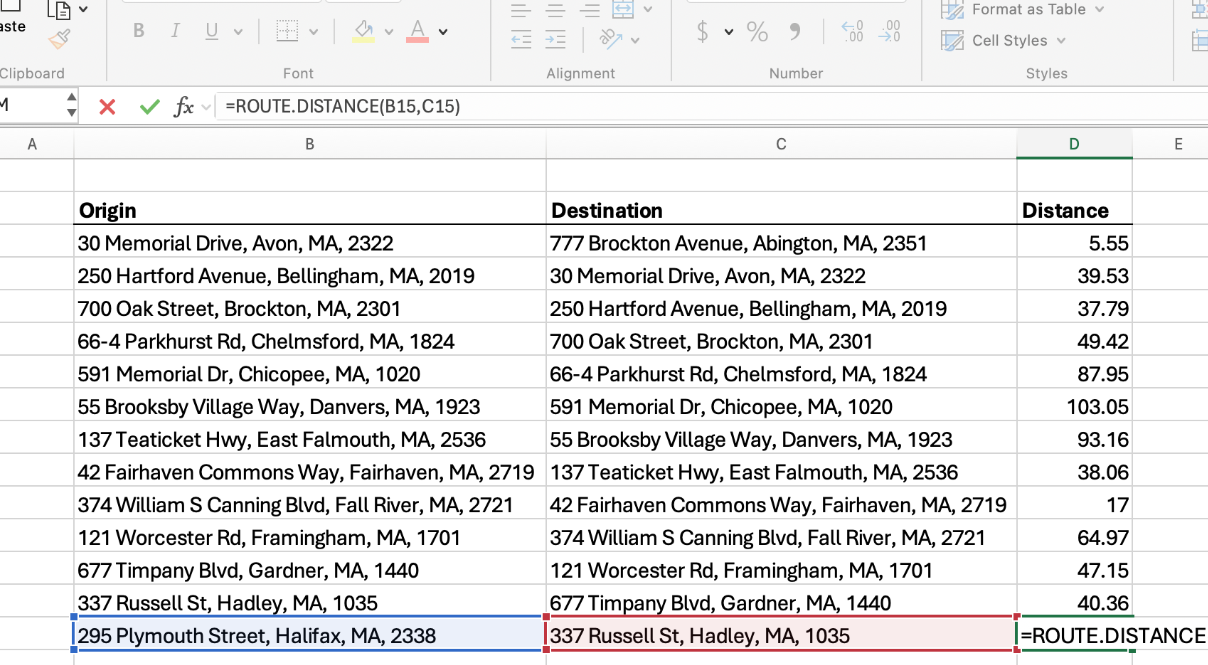
Everything above is quick — except one thing. Filling in the miles for every trip usually means reading your odometer at both ends, or opening Google Maps, typing two addresses, and copying the distance back into your sheet. Do that for a few dozen trips and it becomes the whole chore.
RouteMetrics is an Excel add-in that removes that step. It adds a
ROUTE.DISTANCE formula, so you type the two addresses and get the real driving
miles back in the cell:
=ROUTE.DISTANCE("123 Main St, Pittsburgh PA", "456 Market St, Philadelphia PA")
→ returns the road distance in miles. Fill it down the whole Miles column and every trip is calculated at once — no odometer, no map tab.
It also returns drive time (ROUTE.TIME) and turn-by-turn directions
(ROUTE.DIRECTIONS), and the values stay put when you reopen the workbook.
The free trial includes 100 searches with no time limit.
Get RouteMetrics on Microsoft AppSource See pricing
For each trip: the date, the business purpose, the starting and ending location, and the miles driven. Record trips as they happen rather than reconstructing them later.
$0.76 per mile for business miles driven on or after July 1, 2026, and $0.725 per mile for miles driven January 1 – June 30, 2026. Apply each rate to the trips driven in that period — check irs.gov for the current figure.
No. If you record the trip accurately you can calculate the distance from the start and
end addresses. RouteMetrics' ROUTE.DISTANCE formula returns real road miles
between two addresses, so you can skip odometer readings entirely.
Yes — download it above and use it however you like.
Related: How to calculate route mileage in Excel · Mileage reimbursement calculator for Excel · IFTA mileage worksheet (trucking) · All Excel templates & guides
This guide is general information, not tax advice. Rules and rates change; confirm current requirements with the IRS or a tax professional.
 RouteMetrics