A free Excel calculator that turns business miles into dollars — with the 2026 IRS rates, before and after the mid-year change, built in.
Mileage reimbursement is simple arithmetic: miles driven × the mileage rate. The free Excel calculator below does it for you — a quick total-miles calculator, a per-trip breakdown, and the current IRS rates ready to use.
Download the free Excel calculator (.xlsx)
No email required. Works in Excel for Windows, Mac, and the web.
B5.B6 — 0.76 for miles driven on or after July 1, 2026, or 0.725 for miles driven earlier in the year.=B5*B6 gives your reimbursement.=E12*$B$6 per row (the $ locks the rate). Then =SUM(...) the column.The downloadable calculator has all of this set up, plus the sample numbers so you can see it working.
Most reimbursement uses the IRS standard mileage rates. 2026 is unusual: the IRS raised the rates part-way through the year, so which figure you use depends on when the trip happened, not when you file.
Miles driven July 1 – December 31, 2026:
Miles driven January 1 – June 30, 2026:
If you drove in both halves of the year, split the trips into two groups and apply each rate to its own group — a single blended rate is not accepted. The charitable rate is set by statute and did not change.
Confirm the current figures at irs.gov. The calculator keeps the rate in one cell so a single edit updates every total, and the rate card on the sheet lists both halves of 2026.
The calculation is easy; gathering the miles is the tedious part. Instead of reading
an odometer or checking Google Maps for every trip,
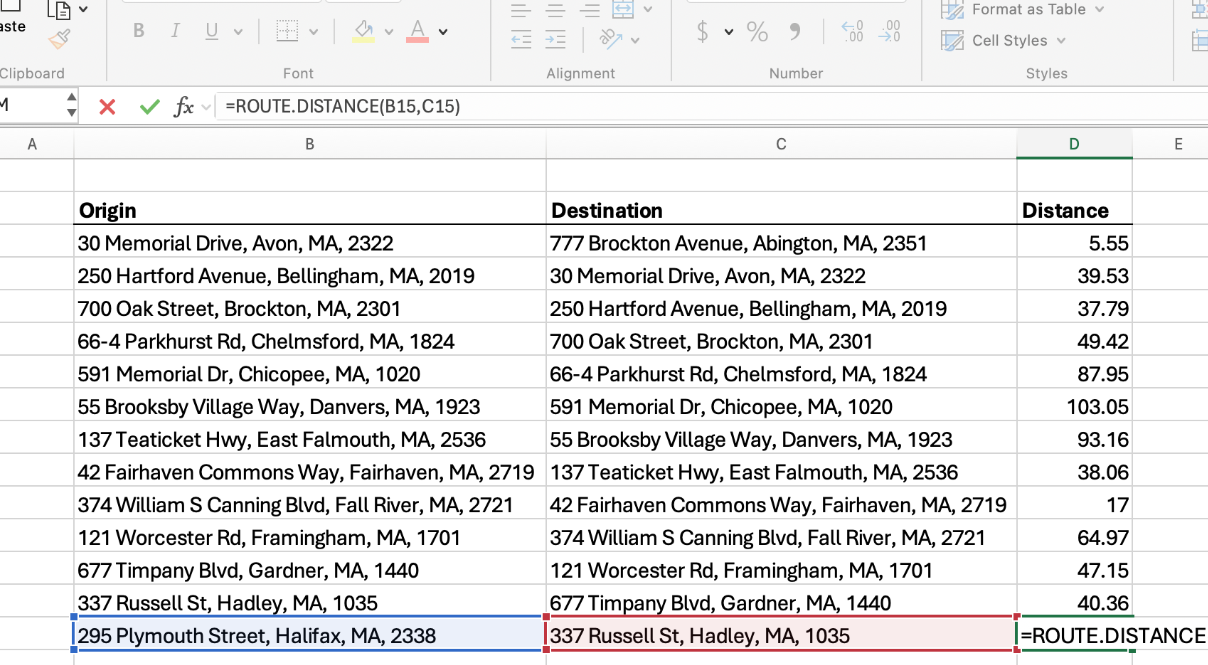
RouteMetrics adds a ROUTE.DISTANCE formula to Excel that returns
real driving miles between two addresses:
=ROUTE.DISTANCE("123 Main St, Pittsburgh PA", "456 Market St, Philadelphia PA")
→ returns the road distance in miles, which the calculator multiplies straight into a dollar amount. Fill it down and a whole month reimburses itself.
Get RouteMetrics on Microsoft AppSource See pricing
Multiply business miles by the mileage rate. At the $0.76/mile business rate for miles driven on or after July 1, 2026, 100 miles = $76.00.
The IRS revised them mid-year. For miles driven July 1 – December 31, 2026: $0.76/mile business, $0.235/mile medical or moving. For January 1 – June 30, 2026: $0.725/mile business, $0.205/mile medical or moving. Charitable is $0.14/mile all year. Check irs.gov before you file.
Yes — download it above and use it however you like.
Related: How to calculate route mileage in Excel · Free mileage log template for Excel · IFTA mileage worksheet (trucking) · All Excel templates & guides
This guide is general information, not tax advice. Rules and rates change; confirm current requirements with the IRS or a tax professional.
 RouteMetrics