An Excel worksheet that fills in your truck miles per state automatically — plus a one-formula summary of every jurisdiction you drove.
IFTA reporting comes down to one tedious number: how many miles you drove in each state or province. Measuring that by hand, trip by trip, is the worst part of the quarter. This free Excel worksheet does it for you — type each trip's start and end address and the miles in every jurisdiction fill in, ready for your quarterly fuel-tax return.
Q3 2026 (Jul 1 – Sep 30) is due October 31, 2026. Quarterly IFTA due dates: Q1 → Apr 30, Q2 → Jul 31, Q3 → Oct 31, Q4 → Jan 31.
Download the free IFTA worksheet (.xlsx)
No email required. Works in Excel for Windows, Mac, and the web. Auto-fill needs the free RouteMetrics add-in.
A walkthrough of the worksheet and the formulas that fill it in.
Tax rates are the one thing the worksheet does not ship. They change every quarter, and a stale rate baked into a file would quietly produce a wrong return — so the column is there, everything downstream of it is calculated, and the sheet links you to the current IFTA, Inc. rate matrix.
RouteMetrics adds real truck routing to Excel formulas. Four of them are built for IFTA, per-state mileage and lane costing:
=ROUTE.STATEMILES("Columbus, OH", "Chicago, IL", "IN", "truck")
→ the truck miles that trip drives in Indiana. Put a column per state and copy it down your whole trip list — it fills like any other formula.
=ROUTE.IFTA(A2:A100, B2:B100, "truck")
→ one formula over your From and To columns spills a complete table: every state your trips crossed and the total miles in each.
=ROUTE.TOLLS("Chicago, IL", "New York, NY", "truck")
→ the toll cost for that lane, as a number you can add straight into cost-per-mile.
=ROUTE.RESTRICTIONS(A2, B2, "truck")
→ “OK”, or what the only available route violates — a low bridge, a posted weight limit, a hazmat prohibition.
Travel mode “truck” keeps you off roads closed to trucks outright. It cannot check a low bridge or a posted weight limit on its own, because those depend on the vehicle. Set your gross weight, height, axle count and any hazmat class once in the RouteMetrics task pane — it saves into the workbook and every truck formula in the file uses it.
gross=80000lb; height=13'6"; width=102; axles=5
→ routes, per-state miles, tolls and legality all computed for that rig rather than a generic truck.
Multi-stop lanes work too: pass a load's pickups and drops in order and the miles are counted through them, which matters for IFTA because a detour puts the truck in states the direct route never enters.
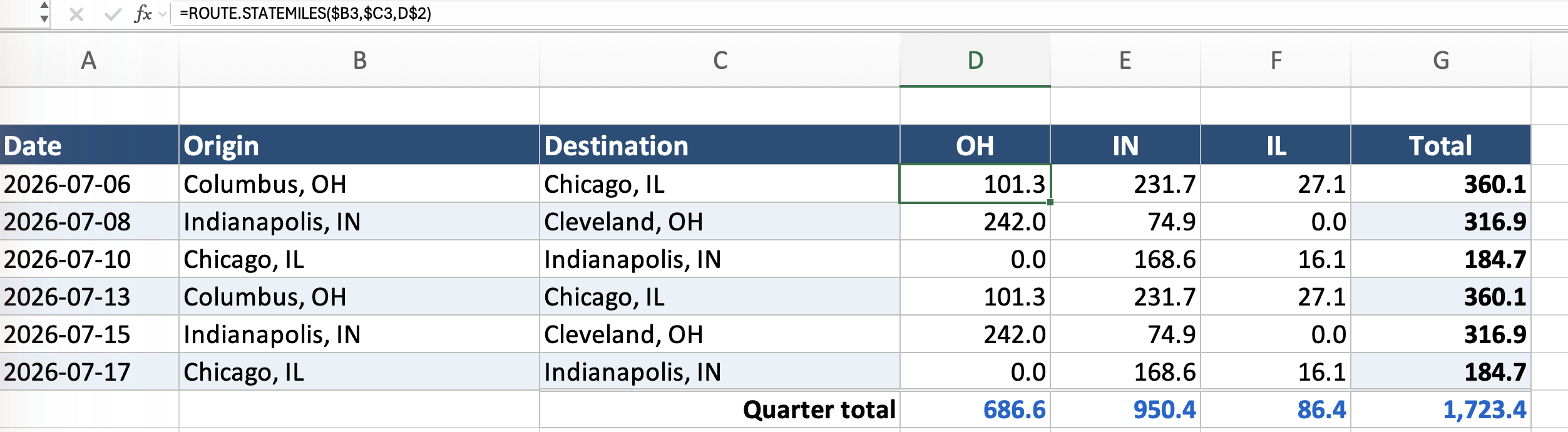
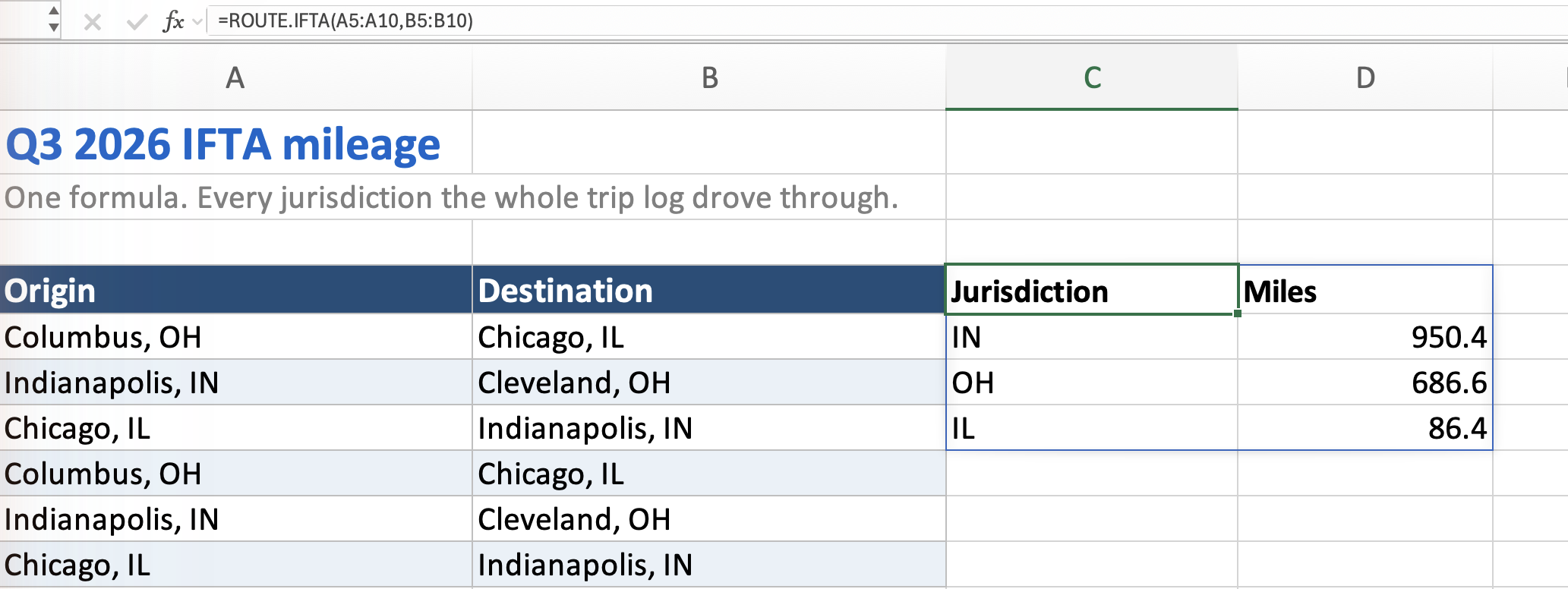
ROUTE.IFTA — one formula, every jurisdiction the trips crossed, totalled to the same miles.Get RouteMetrics on Microsoft AppSource See pricing
=ROUTE.STATEMILES(from, to, "OH", "truck") in each state column, copied down.=SUM(...) — that's your per-jurisdiction mileage.=ROUTE.IFTA(...) to list any state you forgot a column for.The downloadable worksheet already has all of this wired up across four tabs: Trip Log, Fuel Purchases, Tax Calculation, and How to use. The Tax Calculation tab mirrors IFTA-101 column for column, and three live cross-checks under the totals flag the mistakes that actually get caught on audit — a state you never logged a column for, tax-paid gallons that exceed your total volume, and fuel tickets sitting on the wrong fuel type's schedule.
Most Excel IFTA and distance tools are macro-enabled workbooks that call Google Maps from your machine — which means creating a Google Cloud project, generating an API key and putting a card on file before you can calculate a single mile, then paying the mapping provider per lookup on top of whatever the workbook cost.
RouteMetrics does the routing on its own servers. There is no key to manage, no second bill, and nothing asking you to click “Enable Content” — it is a sandboxed Office add-in from Microsoft AppSource, so it also runs in Excel for the web, where macro workbooks cannot run at all. Start with 100 free searches that never expire, then pick a monthly plan or a one-time credit pack — the right shape when your filing is quarterly. More on why that matters →
List each trip's From and To address, then use ROUTE.STATEMILES in a column per state to return the truck miles in that jurisdiction, and sum each column. ROUTE.IFTA can spill every jurisdiction across all trips in one formula.
Yes — miles come from HERE truck-legal routing, not car directions. They're estimates for planning and IFTA prep; verify against your records.
Both. Add your fuel tickets and this quarter's tax rates and the Tax Calculation tab works out fleet MPG, taxable gallons, tax-paid gallons, net gallons and tax due for all 58 jurisdictions, including the Indiana, Kentucky and Virginia surcharges. Rates are not shipped in the file because they change every quarter — you copy them from the IFTA, Inc. matrix.
Yes — ROUTE.TOLLS returns the toll cost for a lane, priced against your truck profile. Toll prices are best-effort and vary by payment method and vehicle class; when a lane can't be priced, the cell says so rather than returning zero.
Yes. IFTA taxes deadhead and repositioning exactly like loaded miles, and omitting them is one of the most common audit findings. The trip log has a Loaded / Empty column so you can track both.
Because Special Diesel is the diesel column. The name is statutory rather than descriptive: state motor-fuel laws split fuels into gasoline and “special fuels” — everything else used to propel a highway vehicle — and diesel fell into the second bucket. If you run ordinary undyed on-road diesel, Special Diesel is the rate you copy. Gasoline, Propane, LNG and CNG match by name; diesel is the only one the matrix calls something else. Dyed off-road diesel appears nowhere on the matrix because it carries no highway tax — and for the same reason its gallons must never go in your tax-paid column, since there is no tax paid to credit back.
Yes — download it above. Filling the miles automatically needs the free RouteMetrics add-in.
The last day of the month after the quarter ends: Q1 (Jan–Mar) is due April 30, Q2 (Apr–Jun) is due July 31, Q3 (Jul–Sep) is due October 31, and Q4 (Oct–Dec) is due January 31. When the date falls on a weekend or holiday, the deadline moves to the next business day.
Related: Mileage log template · Mileage reimbursement calculator · All Excel templates & guides
This guide is general information, not tax or compliance advice. Truck miles are routing estimates and are not a certified mileage source; IFTA rules, rates, and accepted mileage standards vary by jurisdiction. Confirm current requirements with your base jurisdiction or a professional.
 RouteMetrics